What Are the Top Automation Solutions for 2026?

Automation is no longer a distant promise. It is visible in warehouse scanners, software dashboards, and service teams routing requests between systems. In 2026, organizations will compare automation solutions not only by speed, but also by reliability, integration, security, and the effort required to maintain them. A polished demo can impress. Daily operations tell a fuller story.

Bill Gates, a technology entrepreneur, offered a useful caution: “The first rule of any technology used in a business is that automation applied to an efficient operation will magnify the efficiency. The second is that automation applied to an inefficient operation will magnify the inefficiency.” That matters. A fast process can still produce poor results if its underlying steps are unclear. Teams should map work before choosing tools, then test solutions against real tasks and measurable outcomes.

This guide explores leading categories, including robotic process automation, workflow platforms, AI-enabled tools, and integration solutions. It considers where each may help, what implementation demands, and which limitations deserve attention. Not every task. Some work still needs human judgment, especially when exceptions arise or information is incomplete. The strongest choice may not be the most advanced product; it may be the one staff can operate, monitor, and improve. There is no perfect shortlist. Vendor claims change, and actual results vary by organization, so treat comparisons as a starting point—not a substitute for careful evaluation.
What Are the Top Automation Solutions for 2026?

What Automation Solutions Mean in 2026

What Are the Top Automation Solutions for 2026?

In 2026, automation means connecting software, machines, and people to move work forward with less manual repetition. It is not just a robot on a factory floor. Systems may read incoming forms, route routine requests, and flag uncertain cases for human review. The World Economic Forum’s Future of Jobs Report 2025 found that 86% of surveyed employers expect AI and information-processing technologies to transform their businesses by 2030. That matters.

The practical solutions include workflow orchestration, robotic process automation, AI-assisted document handling, and connected industrial equipment. The International Federation of Robotics reported 4.28 million industrial robots operating worldwide in 2023, up 10% from the year before. In a warehouse, this can mean sensors tracking a tote while software updates stock records and sends exceptions to staff. Not magic. Poorly labeled data can still send the wrong item to the wrong shelf.

The strongest approach is usually to automate a clearly measured task, then check error rates, delays, and staff workload. A pilot may look impressive while hiding extra review work. That is worth questioning. Keep a human decision-maker for ambiguous cases, and document where the system fails. The best solution is not always the most advanced one; it is the one people can monitor, correct, and maintain.

The Main Categories of Automation Technology

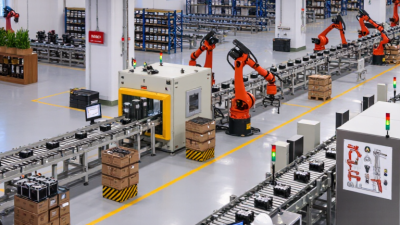
Automation in 2026 spans several distinct, often overlapping categories. Industrial robotics handles physical work: welding, palletizing, and moving parts along production lines. The International Federation of Robotics reported 541,302 industrial robot installations worldwide in 2023, with more than 4.28 million robots operating in factories. These systems suit repetitive tasks that demand consistent speed or precision, but they still need safe layouts, maintenance, and skilled oversight.

Software automation covers digital tasks. Robotic process automation follows rule-based steps, such as transferring invoice details between systems; workflow automation routes approvals and alerts to the right people. Intelligent automation adds machine learning and language tools to interpret documents or classify requests. The World Economic Forum’s Future of Jobs Report 2025 found that 86% of surveyed employers expect AI and information-processing technologies to transform their businesses by 2030. That distinction matters. AI can handle ambiguity, but it can also misread a form or produce an answer that sounds certain. Hybrid systems connect software, sensors, and machines, yet integration remains difficult. Still, these categories overlap, and labels can be messy; buyers should judge them by the task, data quality, and human review required.

Leading Automation Solutions Across Industries

Automation in 2026 is not one machine; it is a connected set of tools. Factories use robots and machine vision for welding, inspection, and repetitive handling. The International Federation of Robotics counted 4.28 million industrial robots operating worldwide in 2023, a 10% annual rise. In logistics, automated mobile equipment moves totes between storage racks and packing stations. MHI’s 2024 Annual Industry Report found that 55% of respondents planned to increase supply-chain technology investment.

Hospitals can automate appointment reminders, equipment tracking, and routine records, giving staff more time for patient care. On farms, sensors and automated irrigation systems help target water and fertilizer to specific rows. The World Economic Forum’s Future of Jobs Report 2025 found that 58% of employers expect robotics and automation to reshape business by 2030. That promise is not automatic. Poorly integrated systems can create extra work, and a sensor may miss what an experienced worker notices. A practical rollout starts with one measurable task, such as reducing packing delays, then checks results with frontline teams before expanding.

How to Compare Automation Platforms and Tools

What Are the Top Automation Solutions for 2026?

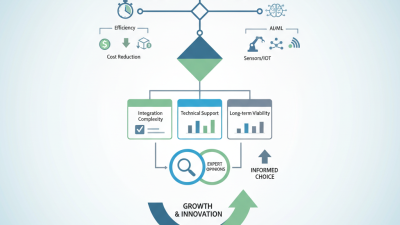
Comparing automation platforms starts with the work, not the feature list. Map one process from trigger to final result: a customer request arrives, gets categorized, and reaches the right team. Then check how each tool handles exceptions, permissions, data transfer, and audit records. A polished demo may hide awkward setup or costly maintenance. Ask for a realistic trial using sample data, and measure completion time, error rates, and staff effort. Small details matter.

Tips: Compare like with like. Test a failed handoff. Check export options, support hours, and pricing as usage grows. Write down what still needs human review.

The best fit depends on your systems and team’s skills. A no-code interface may help nontechnical staff build simple workflows, while complex processes can require deeper configuration. Check whether the platform connects to your existing software without fragile workarounds. Ask who updates workflows when policies or forms change. Pilot one low-risk task for several weeks, then collect feedback from the people doing the work. Some results may be disappointing; that is useful evidence, not a reason to hide the numbers. Choose based on reliable performance and manageable upkeep, not promises alone.

What Are the Top Automation Solutions for 2026? How to Compare Automation Platforms and Tools

This comparison covers major automation solution types rather than ranking individual vendors. Capabilities vary by product and configuration, so validate security, integrations, governance, and total cost against your requirements.

Automation Solution Type How It Works Best-Fit Use Cases Integration Approach Strengths Common Limitations Key Evaluation Criteria
Workflow and Integration Automation Connects applications and moves data between them using triggers, actions, and conditional rules. Synchronizing records, routing requests, sending notifications, and automating routine work across cloud services. Usually relies on APIs, prebuilt connectors, webhooks, and scheduled data transfers. Quick to configure for repeatable, cross-application tasks; reduces manual data entry. Connector coverage and API limits can constrain complex or high-volume workflows; errors require monitoring and recovery design. Connector quality, data mapping, retry handling, run limits, audit logs, and support for private network systems.
Robotic Process Automation (RPA) Uses software robots to interact with user interfaces, often by clicking, typing, and reading on-screen content. Repetitive tasks in older or specialist applications that lack suitable APIs, such as copying information between screens. Typically automates the graphical user interface; some deployments combine UI actions with APIs or document processing. Can automate tasks across applications without changing each application; useful for stable, rules-based procedures. Interface changes can break bots; unattended execution may need careful scheduling, credentials management, and exception handling. Bot resilience, supported environments, credential controls, exception queues, auditability, and maintenance effort.
Business Process Management and Low-Code Workflow Models multi-step business processes, assigns work to people or systems, and tracks each case through defined stages. Approvals, case management, onboarding, service requests, and processes involving both human decisions and automated tasks. Often combines forms, APIs, rules, task queues, and connections to business systems. Provides structured process visibility, ownership, and controls for workflows with handoffs or decision points. Process design and governance take planning; extensive customization can increase complexity and make changes harder to manage. Process modeling, human task management, versioning, permissions, reporting, and portability of workflow data.
IT and Infrastructure Automation Automates the provisioning, configuration, deployment, and operation of infrastructure and IT services. Environment setup, configuration enforcement, software deployment, incident response, and repeatable operational tasks. Uses APIs, scripts, configuration definitions, command-line interfaces, and infrastructure management interfaces. Improves consistency and repeatability; can reduce manual operational work across managed environments. Incorrect rules can affect many systems; safe rollout, testing, access control, and rollback procedures are essential. Change controls, secret handling, environment coverage, testing and rollback, policy enforcement, and execution logs.
Software Test Automation Runs repeatable checks against software to verify expected behavior, often as part of development and release pipelines. Regression testing, API checks, user-interface tests, and validation of applications before release. Connects to test frameworks, source control, build pipelines, browsers, devices, and test environments. Enables frequent, repeatable testing and can identify regressions earlier in the development cycle. Tests need ongoing maintenance as applications change; automated checks do not replace all exploratory or usability testing. Supported test types, reliability, reporting, parallel execution, environment management, and integration with development workflows.
AI-Assisted and Agentic Automation Uses AI models to interpret inputs or generate outputs; some systems can select and execute steps within configured limits. Document classification, information extraction, drafting, knowledge search, and workflows with variable or unstructured inputs. May connect models to business data, APIs, workflow tools, and human review steps. Can handle language and documents that are difficult to process with fixed rules alone; human review can be included for sensitive decisions. Outputs can be inaccurate or inconsistent; privacy, access permissions, traceability, and oversight need explicit controls. Evaluation results, data handling, grounding and citations, approval gates, access controls, monitoring, and fallback behavior.

Comparison tip: Start with the process, systems involved, exception rate, data sensitivity, and required human approvals. Then compare implementation effort, ongoing maintenance, governance, scalability, and total cost—not just the number of features.

Key Factors Shaping Automation Adoption in 2026

Automation adoption in 2026 will depend less on novelty and more on whether tools fit real workflows. Teams should check how a system handles exceptions, connects with existing software, and shares accurate data. A warehouse pilot, for example, may appear successful until labels differ across shifts. Small details matter.

Interoperability and data quality are practical deciding factors. If a workflow depends on clean records, unclear ownership or duplicate entries can undermine the results. Noisy inputs are costly. Organizations also need to consider workforce readiness: staff require time to learn new processes, question automated decisions, and handle cases the system cannot resolve. Training should use realistic tasks, not only polished demonstrations.

Security, reliability, and measurable value shape adoption too. Review access controls, data handling, downtime plans, and human oversight before expanding a pilot. Track concrete measures, such as processing time, error rates, and hours spent on rework. Not every process deserves automation. A small manual step may be safer or cheaper, and admitting that can be difficult when a project already has momentum. Automation works best when people can inspect its output and correct it without delay.

What Are the Top Automation Solutions for 2026? — Key Factors Shaping Automation Adoption in 2026

Employers expect AI and information-processing technologies to have the greatest impact, with robotics and automation also cited by more than half. These expectations point to the technologies most likely to shape automation investment and adoption.

Source: World Economic Forum, Future of Jobs Report 2025. Percentages represent employers expecting each technology trend to transform their business by 2030.