

Why Choose a Desktop Robot for Your Business?
Choosing a Desktop Robot can change how a business handles repetitive, precise, and time-sensitive work. These compact systems fit beside operators, often using less floor space than traditional industrial equipment. In a small electronics workshop, one unit might place components, inspect parts, or move trays between stations. Its value becomes visible during ordinary production, not only during demonstrations.
A Desktop Robot can improve consistency when tasks require steady motion and repeatable positioning. It may also help employees spend more time on quality checks, troubleshooting, and customer-focused work. However, automation is not automatically profitable. A careful business should measure cycle time, maintenance needs, training requirements, and integration costs before purchasing. The cheapest machine may create delays if software support is weak. That matters.
Reliable results depend on proper setup. Clear work instructions, suitable tooling, and routine inspections support safer operation. Businesses should also review the robot’s payload, reach, accuracy, and compatibility with existing equipment. Real experience often reveals small limitations, such as difficult cable routing or frequent fixture adjustments. These details can affect productivity more than headline specifications.
A practical evaluation should begin with one defined task. Track output, error rates, downtime, and operator feedback for several weeks. Then compare the results with current labor and equipment costs. Some companies may discover that a Desktop Robot is ideal for repetitive work. Others may find that process improvement should come first. That conclusion is useful too. Good automation decisions rely on evidence, honest testing, and realistic expectations.
What a Desktop Robot Is and How It Operates
Why Choose a Desktop Robot for Your Business?
What a Desktop Robot Is and How It Operates
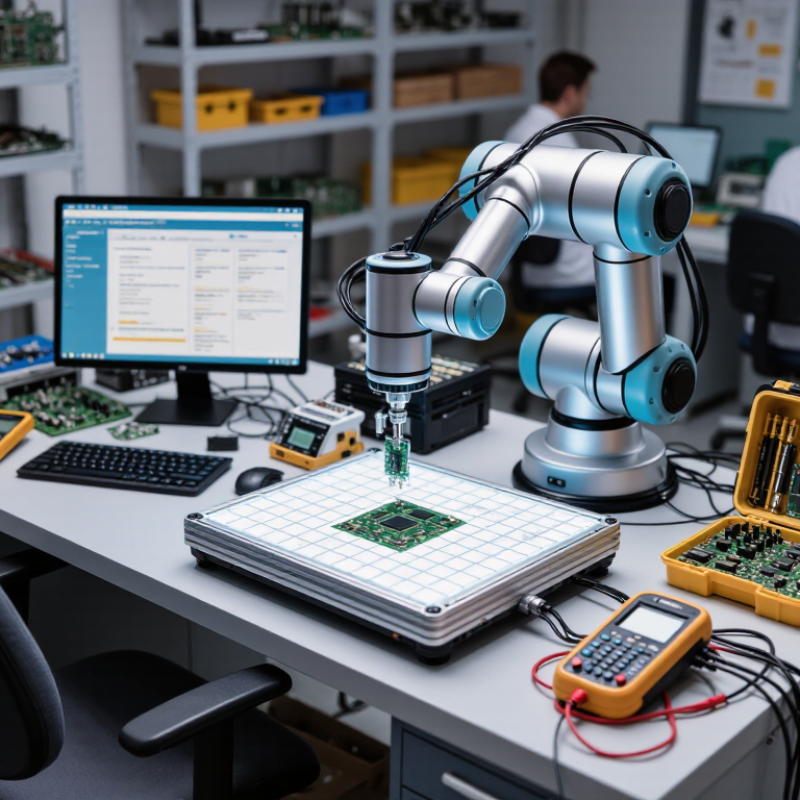
A desktop robot is a compact robotic arm designed for controlled, repetitive tasks. It usually sits beside a worker, on a sturdy bench. Its controller translates programmed coordinates into precise joint movements. Motors drive each joint, while sensors monitor position, speed, and contact. A gripper, dispenser, camera, or screwdriver performs the task. Small footprint. Clear motion.
The International Federation of Robotics reported 4.28 million industrial robots operating worldwide in 2023. That figure shows how automation is moving beyond large production lines. A desktop robot offers a smaller entry point for laboratories, workshops, and assembly cells. It can sort parts, apply adhesive, load test fixtures, or repeat inspection movements. Operators typically teach positions through software, then adjust speed, force, and timing. A camera can identify part orientation before the robot moves.
Performance depends heavily on the surrounding process. The robot may be accurate, but a loose fixture can still create bad results. Glare can confuse vision sensors. Cable routing may restrict movement. According to McKinsey Global Institute, about half of paid work activities have technical automation potential, though not every task is economically practical. A sensible pilot measures cycle time, error rates, setup effort, and worker comfort. The first configuration is rarely perfect. That is useful feedback, not failure. Regular calibration and documented safety checks help maintain reliable operation.
Why Choose a Desktop Robot for Your Business? - What a Desktop Robot Is and How It Operates
| Evaluation Dimension | Typical Desktop Robot Profile | How It Operates | Business Value |
|---|---|---|---|
| Definition | A compact industrial robot designed for installation on a workbench, table, or dedicated desktop station. | The robot controller coordinates motors, joints, sensors, and programmed motion paths to perform repeatable tasks. | Provides automation in locations where a full-size industrial robot cell may be impractical. |
| Typical Reach | Approximately 400–900 mm, depending on the robot configuration. | Joint movements position the tool within a defined three-dimensional work envelope. | Suitable for compact assembly, dispensing, inspection, laboratory, and packaging stations. |
| Typical Payload | Common desktop models handle about 0.5–5 kg, including the end-of-arm tool. | The controller limits motion and acceleration according to the selected payload and tool settings. | Supports lightweight parts, small containers, sensors, grippers, and dispensing tools. |
| Repeatability | Many compact industrial models specify repeatability in the approximate range of ±0.02–0.10 mm. | Encoders and closed-loop motor control help the robot return to programmed positions consistently. | Improves consistency in fastening, dispensing, placement, testing, and visual inspection tasks. |
| Footprint | Usually requires substantially less floor space than a conventional robot cell; the exact area depends on reach and guarding. | The robot is secured to a rigid bench, base plate, or compact workstation. | Helps businesses automate production without major changes to the facility layout. |
| Programming | Often programmed through graphical software, waypoint teaching, scripts, or an integrated control interface. | An operator defines positions, speeds, tool actions, sensor conditions, and task sequences. | Shortens setup time and makes it easier to change products or production batches. |
| End-of-Arm Tools | Typical options include parallel grippers, vacuum tools, screwdrivers, dispensing nozzles, probes, and cameras. | The robot changes or operates a tool to interact with parts, materials, or test fixtures. | Allows one robot platform to support multiple applications and product formats. |
| Operating Speed | Speed varies by model, payload, path, tool, and safety settings; practical cycle time must be validated on the application. | Motion is programmed with acceleration, velocity, dwell, and synchronization parameters. | Can increase throughput for repetitive tasks while maintaining a predictable process rhythm. |
| Power Requirements | Many desktop systems use standard single-phase electrical service; voltage and current requirements vary by model. | A controller converts electrical power into coordinated joint motion and manages connected tools. | Simplifies installation in small workshops, laboratories, offices, and production areas. |
| Sensors and Feedback | Depending on configuration, systems may use joint encoders, vision cameras, proximity sensors, force sensors, or external machine signals. | Feedback allows the robot to verify position, detect parts, adjust movement, or trigger the next step. | Improves process control and supports inspection, error detection, and flexible handling. |
| Safety Considerations | Risk depends on speed, payload, tooling, workpiece, and operating environment; safeguards may include guarding, scanners, interlocks, and emergency stops. | Safety functions can limit speed or stop motion when a protective device is activated. | Supports safer automation when the complete workstation is risk-assessed and properly configured. |
| Best-Fit Applications | Small-part assembly, pick-and-place, dispensing, labeling, inspection, testing, sorting, and laboratory handling. | The robot repeats a defined sequence and exchanges signals with fixtures, sensors, conveyors, or other equipment. | Delivers the greatest benefit where tasks are repetitive, structured, and ergonomically demanding. |
| Implementation Factor | Performance depends on payload, cycle time, part variation, tooling, integration, operator training, and safety validation. | A successful system combines the robot with suitable fixtures, software, sensors, and a clearly defined process. | A pilot test using real parts is the most reliable way to confirm productivity, quality, and return on investment. |
Note: Specifications are representative ranges for desktop robot systems. Actual performance depends on the selected configuration, tooling, application, and local safety requirements.